
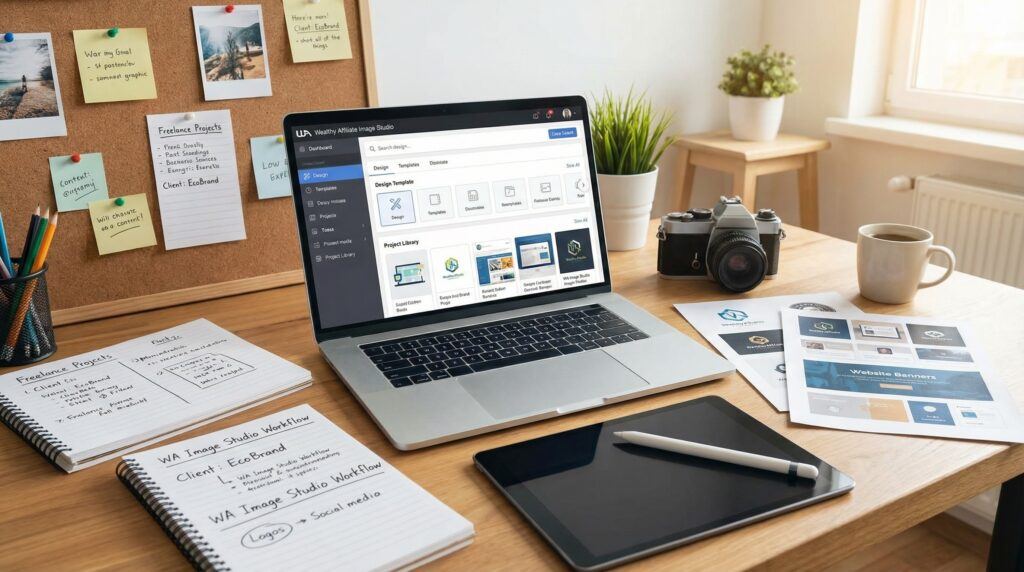
TL;DR
Image Studio at Wealthy Affiliate is an all-in-one image creation and editing tool for creative freelancers who need fast, flexible visuals. It lets you generate, customize, and download graphics for websites, social media, and client projects without jumping between different platforms. With built-in AI credits and a simple editor, you can produce branded, polished visuals even if you are not a trained designer. The article shows how Image Studio can save you time, support your freelance income, and help you present your work with confidence.
Introduction
For years, my creative life was scattered across too many tools.
Canva for quick designs. Stock sites for photos. Separate editors for resizing and background removal. At the same time, I was dealing with slow internet, tight budgets, and clients who still expected polished visuals on their timelines, not mine.
Add power cuts, data limits, and the usual “Can you just tweak this one more thing?” messages, and you get the real picture of a creative freelancer’s life, especially in places where resources are thin and time is never enough.
When Wealthy Affiliate introduced Image Studio, I did not jump in because it was new. I jumped in because I was tired of juggling. I needed one place where I could think, write, and design without feeling like a part-time technician.
That is where Image Studio fits my world. It is not just a fun AI toy. It is a working tool, built into a platform I already use, that lets me produce the visuals my business and my readers need without adding more noise or more monthly fees.
In this article, I want to walk you through Image Studio from a freelancer’s point of view. Not as a software review, but as someone who uses it to keep a creative business alive, especially when the power goes off or the budget is tight.
What Is Image Studio at Wealthy Affiliate?
Image Studio is Wealthy Affiliate’s built-in visual creation tool. Instead of jumping between design platforms and stock sites, you work inside one environment where you can:
- Generate images with AI
- Edit and enhance them immediately
- Resize them for different platforms
- Export them for client work, your own brand, or digital products
No extra installations. No separate subscriptions. No switch between tools just because you need to remove a background or create a Pinterest pin.
The part I appreciate most is how it fits naturally into my existing work. I already write, build websites, and do affiliate marketing inside Wealthy Affiliate. Adding Image Studio to that workflow feels like adding another quiet worker to the team, not another noisy app competing for attention.
You can get started with 2,000 FREE AI credits today!
Why Image Studio Matters for Freelancers
Whether you are in Nairobi, Juba, London, or anywhere else, most freelancers fight the same battles:
- Limited time
- Limited money
- Clients who want fast results
- A brain that can only handle so many logins and tabs
When you juggle too many tools, you pay a “mental tax” every day. You lose a few minutes here and there, and over a month, those minutes turn into hours that could have been spent writing, pitching, or building products.
Image Studio helps reduce that tax. You log into one platform, and the same place where you learn, write, and build websites becomes the place where you create visuals as well.
For me, as a creative nonfiction author and online business builder, this has changed how I plan my content. Once I finish a post, I no longer think, “Now I need to go elsewhere to design the images.” I simply open Image Studio and keep going.
Key Features Through a Freelancer’s Eyes
AI Image Generation in Seconds
Type an idea, wait a few seconds, and you have a visual.
- “A minimalist book cover about African creative nonfiction”
- “Warm earth-tone infographic about the writing process”
- “Professional YouTube thumbnail with a smiling writer holding a notebook”
Instead of staring at a blank canvas, you start with ready-made options. This is powerful when you need to send concepts quickly to a client or create visuals for multiple posts in one sitting.
I often use AI generation to break creative blocks. If I do not know what kind of featured image will work, I generate three or four options and let my eyes decide.
All-in-One Workspace
In the past, my workflow looked like this:
Search for a stock image.
Download it.
Upload it into another tool.
Remove the background.
Download it again.
Upload it into yet another editor to add text.
With slow internet, this is not “workflow.” It is punishment.
Inside Image Studio, everything lives in one interface:
- Generate the image
- Clean the background
- Add text overlays
- Adjust colors
- Export
No back and forth. No multiple downloads. For a freelancer, that means fewer steps, fewer things that can go wrong, and more energy left for real creative work.
Built-In Editor
The editor inside Image Studio lets you:
- Crop
- Resize
- Remove or clean up backgrounds
- Expand the scene
- Add text and filters
- Adjust composition
This matters when clients say, “Can you move that text a little?” or “Can we use the same image for a taller Pinterest pin?”
You do not have to open Photoshop or some heavy desktop program. You make adjustments inside the same tool that generated the image.
Easy Resizing for Every Platform
One blog post today may need:
- A 1200 x 628 featured image
- A 1000 x 1500 Pinterest pin
- A YouTube thumbnail
- A square image for social media
Resizing manually in traditional tools used to consume my evenings. With Image Studio, resizing becomes another quick step, not a separate project.
Once I like one design, I simply duplicate and adjust it for:
- Blog headers
- Instagram and Facebook posts
- Story formats
- YouTube banners or thumbnails
For freelancers, this is where you turn one idea into a package you can deliver or sell.
Beginner-Friendly Prompt Suggestions
You do not need to be a “prompt engineer.”
Image Studio includes guiding prompts and suggestions so that even if you do not know how to describe what you want, the system helps you move from a vague idea to a usable request.
This is a blessing when you are tired. Late at night, after writing thousands of words, the last thing I want is to think hard about how to describe an image. Simple prompts plus suggestions keep the work moving.
Versatile Format Support
Freelancers rarely work with only one type of visual. In one week, I might need:
- Blog featured images
- Email header graphics
- YouTube thumbnails
- Infographics for teaching posts
- Simple memes for social media
- Product mockups for digital downloads
- Banners for WA tutorials
Image Studio handles all of these formats in one place. Over time, that has allowed me to cancel several subscriptions and rely more on a single environment.
Brand Consistency From One Hub
Brand consistency is where many freelancers, especially beginners, lose trust without realizing it.
Different fonts. Different colors. Different styles. Over time, your body of work looks like ten people did it, not one.
Because Image Studio keeps all your images under one roof, you can:
- Use the same color palette
- Reuse similar fonts
- Keep layouts consistent
- Build a visual identity that people recognize
For someone like me, who writes about meaning, purpose, and writing itself, a consistent visual identity supports the message and helps people remember the brand.
Rapid Edits and A/B Testing
Sometimes the difference between a “good” and “great” image is a single change:
- A brighter background
- A different facial expression
- A clearer font
- A stronger color contrast
With Image Studio, I generate multiple versions quickly and test them:
- In my own analytics
- With client feedback
- On social platforms
This ability to iterate quickly means your visuals improve over time without burning out your energy.
Monetizing Visual Assets
Once you can produce images quickly, you suddenly have more to offer:
- Pre-made social media packs
- Ready-to-use Pinterest templates
- Custom thumbnails as a standalone service
- Ebook cover concepts
- Infographic designs for bloggers or coaches
I have used Image Studio to support my own offers and to create assets I could use in side gigs. The speed of creation makes it easier to say yes to new ideas without promising something that will take too much time to deliver.
Control Over Remix and Rights
As freelancers, we live in a world of contracts and expectations. Some clients want exclusivity. Others do not. Inside Image Studio, you can manage remix settings and control how your images may be reused.
This gives you room to:
- Keep certain visuals exclusive to a client
- Reuse elements or styles in your own brand
- Create public assets without risking client trust
This matters not only ethically but legally and professionally.
Ongoing Improvements
One subtle benefit is that the Wealthy Affiliate team handles the AI model upgrades behind the scenes. That means the image quality keeps improving without you having to install new software or learn entirely new tools.
As a freelancer, I simply log in, and the tool is better than last month. That quiet improvement is one less thing I must manage on my own.
How I Use It
My basic prompt:
Create an infographic for the following:
Title: How to Overcome Fear and Self-doubt as a Creative Entrepreneur
Italicize subtitles/taglines (if any exists)
Use relevant infographics.
Sizes: 1200 x 628
Font: Baskerville
Color codes: /* CSV */ fae875,7b5c13,f8f5e4,c7a84c,b29537,a99669,97791e,a48329,85703e,bcb482
And the results:
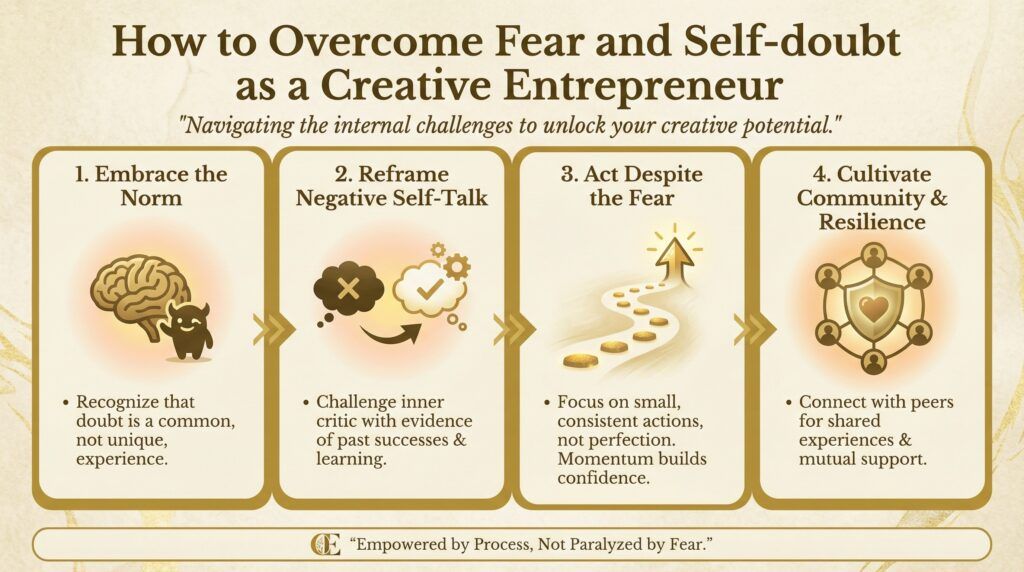
TIP: You don’t need a complicated language to command/prompt the tool. You don’t need to know the exact color codes for your branding. You can describe them, and it still works.
This means the Image Studio is getting better and better each day with creating images with texts as you can see above. You too can bring your creative work to life, just by describing it. What are you waiting for? Grab this tool and get free 2,000 AI credits worth of 20 designs to start with.
Do you know what? You can create those designs for money and pay your membership fees, and have a profit! Just look for clients who are in need of such visual design services and start a business. That’s a trick. No, that’s a business idea in a nutshell.
Getting Started With Free Credits
Wealthy Affiliate makes it easy to try Image Studio without financial pressure.
- You create a free Starter account.
- You log into your dashboard.
- You access Image Studio.
- You find 2,000 AI credits waiting for you. Get them here.
No separate billing setup. No third-party subscriptions. No hidden software to install.
With those credits, you can:
- Experiment with styles
- Create images for your own blog
- Build sample visuals to show potential clients
- Test how this could fit into your workflow
I like this approach because it respects freelancers who are still testing their business model. Before you commit to anything, you can see actual results on your screen and in your projects.
Real-World Use Cases From My Own Workflow
Social Media Assets
I often use Image Studio to create:
- Pinterest pins for article promotion
- YouTube thumbnails for teaching or reflection videos
- Instagram graphics that share quotes from my writings
Instead of designing each visual from scratch, I build a few base styles and reuse them for different posts. This keeps my brand consistent while saving hours every week.
Branding for Creators and Small Businesses
If you work with content creators, coaches, or small business owners, they often need:
- Channel art
- Launch graphics
- Cohesive visuals for a new series or product
Image Studio lets me build simple “brand packs”:
- A logo-style graphic
- A banner
- A few social posts
- A cover image for an ebook or lead magnet
This kind of package is attractive for clients and simple to produce once you know your way around the tool.
Merch and Print Designs
For those who run print-on-demand shops or offer physical items:
- T-shirt concepts
- Simple poster ideas
- Sticker-style graphics
can all start inside Image Studio. You generate, adjust, test, and then export to send to your printing platform.
If you are in an African city or anywhere with limited access to design agencies, this is a realistic way to launch your own designs without heavy software.
Local Business Promotions
Local businesses often need quick visuals but cannot pay agency rates:
- Real estate flyers
- Event banners
- Restaurant specials
- Church or community event posters
With Image Studio, you can respond fast and still deliver polished work. This can be a powerful side income stream for a freelance writer or designer who lives near markets, churches, schools, or small companies.
Digital Product Design
If you sell digital products, you already know how important visuals are:
- Ebook covers
- Checklists and worksheets
- Simple planners and guides
- Course thumbnails
I use Image Studio to design visuals that match the tone of my writing. Warm colors, calm fonts, and clear layouts help my readers trust the material before they even open it.
Professional Services
Freelancers who offer consulting, coaching, or training can use Image Studio to create:
- Presentation slides
- Pitch deck visuals
- LinkedIn banners
- Simple diagrams for teaching
These little visual upgrades send a message: you respect your audience enough to present your ideas clearly.
Tips for Getting the Most Out of Image Studio
Be Specific With Your Prompts
“Logo” is not enough. Try something like:
“Minimalist logo for a creative nonfiction writer, warm earth tones, soft edges, simple icon of an open book and river.”
The more details you add, the closer the result will match what you see in your mind.
Batch Your Work
Instead of generating one image at a time, plan sessions:
- One session for blog headers
- One for social media graphics
- One for client concepts
Batching helps you stay in a creative flow and makes better use of your AI credits.
Experiment Freely
Do not be afraid to:
- Change colors
- Test new layouts
- Try different illustration styles
Sometimes, the “wrong” result triggers the right idea.
Build Brand Templates
Once you are happy with a style:
- Save color codes
- Decide on two or three main fonts
- Keep a folder of reference images and layouts
Next time you design, you start from a known base, not from zero.
Explore New Gigs
When you get comfortable with Image Studio, look at your skills and ask:
- Can I offer thumbnail design?
- Can I provide Pinterest image packs?
- Can I help local businesses with flyers?
Often, the tool will reveal services you did not think you could offer before.
Things to Consider Before Using Image Studio for Client Work
Licensing and Rights
Always clarify:
- How your client will use the images
- Whether they need exclusivity
- What you are comfortable granting
Write this clearly into your contracts or agreements.
Image Resolution and Print Quality
Most outputs work well for web use. For high-quality print:
- Test sample downloads
- Discuss resolution requirements with your printer or client
- Adjust your designs if needed
Do a small print test before promising a full print run.
AI Unpredictability
AI can misunderstand prompts. Factor in time for:
- Retrying prompts
- Cleaning up small details
- Regenerating images that miss the mark
This is normal and should be built into your schedule, especially for client deadlines.
Client Feedback and Revisions
Show clients draft visuals early:
- Present two or three variations
- Let them pick a direction
- Refine from there
This prevents last-minute surprises and reduces frustration for both sides.
Conclusion
Image Studio at Wealthy Affiliate is more than a new button on your dashboard. Used well, it can become:
- Your in-house designer
- Your idea generator
- Your brand consistency partner
- Your silent team member that works without complaining about long hours
For freelancers, especially those building a career with limited resources, this combination of AI generation, built-in editing, easy resizing, and free starting credits is not just convenient. It is practical.
You do not need to be a graphic designer. You do not need to buy expensive software. You only need a clear idea of who you serve, what visuals they need, and a willingness to experiment.
From there, Image Studio can help you turn that vision into real images, client projects, and new income streams, all inside the same platform where you are already building your online business.
If visuals are part of your work, Image Studio is worth exploring until you know exactly how it can serve your creative journey.
FAQs
What is Image Studio at Wealthy Affiliate?
Image Studio is Wealthy Affiliate’s built-in image creation and editing tool. It lets you generate AI images, add text, adjust colors, and export visuals for use in your blog posts, social media, and client work.
How does Image Studio help creative freelancers specifically?
It cuts down the time spent hunting for stock photos or switching between design apps. You can create project-ready images inside the same platform where you build websites, write content, and manage your online business.
Do I need advanced design skills to use Image Studio?
No. Image Studio is made for non-designers as well as professionals. You work with simple prompts, presets, and an easy editor, so you can create clean, branded visuals without learning complex software.
What kinds of projects can I create with Image Studio?
You can design featured images for blog posts, social media graphics, promo banners, book or course visuals, simple logos, and mockups for client presentations.
Can I use Image Studio images for paid client work?
Yes, in general you can create visuals to use in client projects and your own business branding. However, you should always review Wealthy Affiliate’s latest terms and licensing rules to be sure you are using the images within their guidelines.
How do AI credits work inside Image Studio?
Your Wealthy Affiliate account includes a set number of AI credits that you spend each time you generate images. When credits run low, you can top them up or adjust how many images you create so you stay within your budget.
Is Image Studio enough to replace tools like Canva or Photoshop?
For many freelancers, Image Studio covers everyday needs such as blog graphics, social media posts, and simple branding images. If you require very advanced photo editing or complex layouts, you might still pair it with other tools, but Image Studio can handle most routine visual tasks on its own.

John, you have expertly woven a tale through the full use of every aspect of this phenomenal AI tool. I have been using the Wealthy Affiliate Image Studio for a few months, and the image quality has drastically improved from version 1 to version 2, with the most accurate text in an image of any AI I have used so far. Kyle and Carson are mastering the process of training Artificial Intelligence.
Hey John,
This is a well written review as always. I agree with your sentiments about having one place for image creation instead of all these tools open just to create one thing. That is definitely a plus to using Image Studio. The most I’ve had to do was use Canva to put on titles but to be fair even that was before the most recent update where text is supposed to be better.
Still, one way or the other, its a whole lot more straightforward and convenient.
My Pinterest pins that I’ve generated with Image Studio are doing a lot better than my pins that I’ve created by others means, even my stock photo images. The quality produced is really top-tier.
There’s so much to be said and so much things we can now do because of this tool.
Happy creating and good job for learning how to generate images with AI too. Your imagery has really imrpoved as well. Keep it up! 🤗
~ Marlinda
The image studio you describe within the Wealthy Affiliate platform sounds like a practical tool. Bundling tasks like editing and formatting into one workspace must cut down on the time spent switching between different programs. The ability to create simple branded graphics directly there is a smart integration that tackles a common small business need.
Having a dedicated, straightforward tool for this could encourage more freelancers to maintain a consistent visual style across their own websites and client projects, which is a professional touch that is sometimes overlooked in favor of just getting content published.
You mention the studio is useful for creating logos and social media graphics. What range of customization is typically possible with the available templates—are we talking mainly about text and color changes, or can users significantly alter layouts?
Hi The Investor, thank you for reading and for noticing the real value here. For freelancers, switching between tools can quietly drain time and focus. A simple workspace that lets you create clean, branded visuals without overthinking it helps you publish faster and still look professional.
On customization, it is more than just changing text and colors. You can typically adjust things like fonts, sizes, spacing, alignment, and you can swap backgrounds, shapes, icons, and images. In many cases you can also move elements around and rebuild a design so it feels like your own, not like a template. The main limit is that it is designed to stay straightforward, so it will not feel as “free-form” as advanced tools like Photoshop or Illustrator where you can do anything from scratch.
The Investor, what are you mainly aiming to create in Image Studio: a consistent brand kit for your own site, or quick client-ready graphics for different brands?