Creating quality visuals used to mean juggling multiple design platforms, downloading stock photos, and switching endlessly between editing tools. For many freelancers and content creators, that process consumed more time than actually creating content.
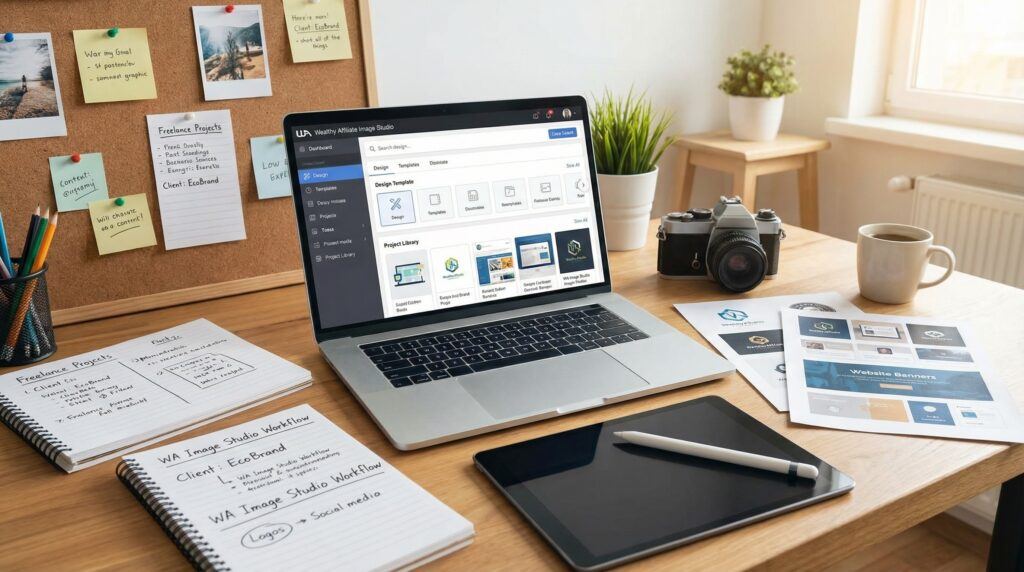
When Wealthy Affiliate introduced Image Studio, it simplified that workflow by bringing AI image generation, editing, resizing, and exporting into one integrated workspace. Instead of managing several subscriptions, you can create and edit visuals directly inside the same platform where you build websites, publish content, and grow your online business.
Whether you’re a blogger, affiliate marketer, author, or freelance designer, Image Studio provides an accessible way to produce professional graphics without needing advanced design experience.
Quick Answer
To get started with Image Studio at Wealthy Affiliate, create a free Starter account, access Image Studio from your dashboard, use your free AI credits to generate images, customize them with the built-in editor, and export them for your website, social media, or client projects.
TL;DR
Image Studio combines AI image generation, editing, resizing, and branding tools into one workspace inside Wealthy Affiliate. Beginners receive free AI credits to experiment, while freelancers can use it to create blog graphics, Pinterest pins, YouTube thumbnails, marketing materials, and client designs without switching between multiple applications.
Affiliate Disclosure
Some links in this article are affiliate links. This means I may earn a commission if you click a link and make a purchase, at no additional cost to you.
I only recommend products, services, and resources that I believe may provide genuine value to my readers. Affiliate commissions help support this website and allow me to continue creating useful content.
My recommendations and opinions are my own and are not influenced by affiliate relationships.
Table of Contents
- What Is Image Studio?
- Why Content Creators Should Use It
- Key Features
- How to Get Started
- Practical Uses
- Tips for Better Results
- Frequently Asked Questions
- Final Thoughts
What Is Image Studio?
Image Studio is Wealthy Affiliate’s built-in AI image creation and editing platform. Instead of relying on several different design applications, everything happens within one workspace. I love using them than Kre8or, another image creation tool by the same company mainly because it is hosted elsewhere. But this is personal.
You can:
- Generate AI images.
- Edit and enhance visuals.
- Remove backgrounds.
- Resize images for multiple platforms.
- Add text and filters.
- Export finished graphics.
Because it integrates directly with Wealthy Affiliate, it fits naturally into the workflow of bloggers, affiliate marketers, and online entrepreneurs. I love using it for creating images for my blog posts and social media channels. I don’t pay a monthly subscription for it because it is part of my yearly membership.
Why Content Creators Should Use It
Every content creator faces similar challenges:
- Limited time.
- Multiple software subscriptions.
- Tight budgets.
- Constant requests for fresh visuals.
Image Studio reduces these frustrations by eliminating the need to move between several applications. Once your article is complete, you can immediately create matching graphics without leaving the Wealthy Affiliate platform.
Key Features
AI Image Generation
Simply describe the image you want, and Image Studio generates multiple concepts within seconds. You also need to learn prompt engineering to use it well. I use ChatGPT to create prompts that I then use in this platform since it’s not a chat bot. It doesn’t give you feedback except the image it creates.
Whether you need:
- Blog featured images.
- Book covers.
- Infographics.
- Social media graphics.
- YouTube thumbnails.
AI provides a strong starting point that you can refine further. I need images for my blog posts and social media pages. But I don’t use images a lot at the time of this writing even though I have to give it some thought. Most people learn through visual, and they might then end up on your website.
All-in-One Workspace
Instead of downloading images, uploading them elsewhere, removing backgrounds, and repeating the process across several websites, everything happens inside one editor. This is because the WA is connected to your WordPress dashboard where you can publish these images by a few clicks.
This significantly simplifies the creative process. But I don’t mostly use this process though it’s the fastest way. I download the image first so that I could save and keep it for future use. This too is personal. Most people don’t download their images and that’s fine.
Built-In Editor
The editor includes tools to:
- Crop images.
- Resize graphics.
- Remove backgrounds.
- Expand scenes.
- Add text.
- Apply filters.
- Adjust composition.
Most everyday editing tasks can be completed without opening separate software. You can use the same tool within your dashboard to edit and save images online or download them to your computer if needed. This makes your work much easier, doesn’t it? It does for me.
Easy Platform Resizing
One design can quickly become:
- Blog featured images.
- Pinterest pins.
- Facebook graphics.
- Instagram posts.
- YouTube thumbnails.
This makes content repurposing much faster. It never been easier to achieve than now. Same image, different sizes for different platforms. But you need to know which sizes are for which platforms because the system doesn’t tell you this. All it shows you is image sizes and styles you can create and generate. Do your research here.
Beginner-Friendly Prompts
You don’t need to master prompt engineering. But you have to be specific, or you get generic results and outputs. It’s not difficult to learn prompt engineering basics to have the best results at the first attempts before wasting your AI credits.
Image Studio provides prompt suggestions that help transform simple ideas into polished visuals, making it accessible even for complete beginners. You need to know how and where to find these prompt suggestions but only when you are inside the platform. Practice makes perfect. Every tool needs some learning curve.
Brand Consistency
Keeping all your visuals inside one workspace makes it easier to maintain:
- Consistent colors.
- Matching fonts.
- Similar layouts.
- Recognizable branding.
Strong visual consistency helps readers recognize your work overtime. This is branding, and it matters a lot. Image Studio does pick your branding from how you use it. It learns about your color palettes, and you can even give it your logo to make the learning fast and accurate.
How to Get Started
Starting with Image Studio is straightforward.
1. Create a free Wealthy Affiliate Starter account.
2. Log into your dashboard.
3. Open Image Studio.
4. Use your free AI credits to begin generating images.
5. Edit, resize, and customize your designs.
6. Export your finished graphics for your blog, business, or clients.
The free credits allow new users to experiment without financial pressure before deciding whether the tool fits their workflow. When you find it helpful, you can then upgrade to get more credits to use in your actual projects. That’s how flexible it is to get started, today. You can also choose not to upgrade if the tool doesn’t work for you. But only after trial.
Practical Uses
Image Studio supports a wide variety of creative projects. I will list a few of these projects below, but don’t forget that they might be adding new features at will. You have to check out the platform yourself to stay up to date. These days, things change overnight. Even Google’s homepage might not be the same tomorrow evening. Test things, yourself.
You can create:
- Blog featured images.
- Pinterest pins.
- YouTube thumbnails.
- Instagram graphics.
- Ebook covers.
- Product mockups.
- Flyers.
- Event posters.
- Brand packages.
- Presentation graphics.
Freelancers can also package these services for clients, opening additional income opportunities beyond writing alone. I only have clients for websites at the time of this writing, simply because I haven’t published what I can do with Image Studio. Others are making money with the tool in many ways. Check out this article/video for more info.
Tips for Better Results
To get the most from Image Studio:
- Write specific prompts.
- Batch similar design work together.
- Experiment with different styles.
- Save your brand colors and fonts.
- Build reusable templates.
- Explore new freelance services using your design skills.
The more consistently you use the platform, the more efficient your workflow becomes. You and Image Studio will learn from each other. This takes time and consistency. But you can only achieve this goal after you tried or tested the tool, then upgrade to have more credits to use. Experience is the best teacher.
Frequently Asked Questions
What is Image Studio at Wealthy Affiliate?
Image Studio is Wealthy Affiliate’s built-in AI image generator and editor for creating blog graphics, social media images, and marketing visuals.
Do I need graphic design experience?
No. The platform is designed for beginners and professionals alike, using simple prompts and easy editing tools.
What kinds of images can I create?
You can design blog graphics, featured images, banners, book covers, social media posts, thumbnails, simple logos, and promotional materials.
Can I use Image Studio for client work?
Yes. You can generally create images for clients and your own business, although you should always review Wealthy Affiliate’s current licensing terms before commercial use.
Can Image Studio replace Canva or Photoshop?
For many bloggers, affiliate marketers, and freelancers, Image Studio covers most everyday design needs. Advanced designers working on highly specialized projects may still choose to supplement it with other software.
Final Thoughts
Image Studio makes visual content creation much more accessible by bringing AI generation, editing, branding, and exporting together inside Wealthy Affiliate. Instead of spending your time managing multiple applications, you can focus on creating content that serves your audience and grows your business.
Whether you’re launching your first blog or expanding a freelance business, Image Studio provides a practical starting point for creating professional visuals with minimal technical barriers. With its free AI credits, integrated workflow, and beginner-friendly interface, it’s an excellent tool to explore as you build your online presence.
And if you want to know what’s happening in my world as a writer and digital nomad, check out my Wealthy Affiliate blog page here: https://my.wealthyaffiliate.com/johnmaluth/blog.

John, you have expertly woven a tale through the full use of every aspect of this phenomenal AI tool. I have been using the Wealthy Affiliate Image Studio for a few months, and the image quality has drastically improved from version 1 to version 2, with the most accurate text in an image of any AI I have used so far. Kyle and Carson are mastering the process of training Artificial Intelligence.
Hey John,
This is a well written review as always. I agree with your sentiments about having one place for image creation instead of all these tools open just to create one thing. That is definitely a plus to using Image Studio. The most I’ve had to do was use Canva to put on titles but to be fair even that was before the most recent update where text is supposed to be better.
Still, one way or the other, its a whole lot more straightforward and convenient.
My Pinterest pins that I’ve generated with Image Studio are doing a lot better than my pins that I’ve created by others means, even my stock photo images. The quality produced is really top-tier.
There’s so much to be said and so much things we can now do because of this tool.
Happy creating and good job for learning how to generate images with AI too. Your imagery has really imrpoved as well. Keep it up! 🤗
~ Marlinda
The image studio you describe within the Wealthy Affiliate platform sounds like a practical tool. Bundling tasks like editing and formatting into one workspace must cut down on the time spent switching between different programs. The ability to create simple branded graphics directly there is a smart integration that tackles a common small business need.
Having a dedicated, straightforward tool for this could encourage more freelancers to maintain a consistent visual style across their own websites and client projects, which is a professional touch that is sometimes overlooked in favor of just getting content published.
You mention the studio is useful for creating logos and social media graphics. What range of customization is typically possible with the available templates—are we talking mainly about text and color changes, or can users significantly alter layouts?
Hi The Investor, thank you for reading and for noticing the real value here. For freelancers, switching between tools can quietly drain time and focus. A simple workspace that lets you create clean, branded visuals without overthinking it helps you publish faster and still look professional.
On customization, it is more than just changing text and colors. You can typically adjust things like fonts, sizes, spacing, alignment, and you can swap backgrounds, shapes, icons, and images. In many cases you can also move elements around and rebuild a design so it feels like your own, not like a template. The main limit is that it is designed to stay straightforward, so it will not feel as “free-form” as advanced tools like Photoshop or Illustrator where you can do anything from scratch.
The Investor, what are you mainly aiming to create in Image Studio: a consistent brand kit for your own site, or quick client-ready graphics for different brands?