
Remote work can look like freedom from the outside.
You can work from a laptop, choose your working hours, communicate with people in different countries, and earn without sitting in a traditional office. For African digital entrepreneurs, this freedom can be especially valuable because digital work can connect local talent with global opportunities.
But working remotely does not automatically make you productive.
A laptop can become an office, library, entertainment center, communication hub, and distraction machine at the same time. Add email, messaging apps, cloud storage, project management software, artificial intelligence tools, social media, video meetings, and multiple browser tabs, and your digital workspace can become more complicated than a physical office.
The answer is not necessarily another productivity app.
The better answer is a simple remote work system.
A remote work system is a practical combination of your workspace, tools, routines, priorities, and boundaries that helps you consistently move important work forward.
For me, this connects directly with a principle I have learned through writing, publishing, digital entrepreneurship, and working across different environments: tools should support the person using them. They should not become the purpose of the work.
Key Takeaways
- A remote work system is more than a collection of software tools.
- Start with your work and priorities before choosing technology.
- Keep your essential tools few, familiar, and connected.
- Separate focused work from communication and entertainment.
- Build routines that work even when internet access, electricity, or working conditions are imperfect.
- Review your system regularly and remove tools that create more noise than value.
- Use technology to strengthen your purpose, skills, and ability to serve others.
TL;DR
A simple remote work system combines a clear purpose, a small set of useful tools, a reliable workspace, focused working periods, communication boundaries, and regular review. African digital entrepreneurs should design systems around the realities of their work, including connectivity, electricity, devices, payments, clients, and collaboration across borders. The goal is not to use more technology. The goal is to use the right technology well.
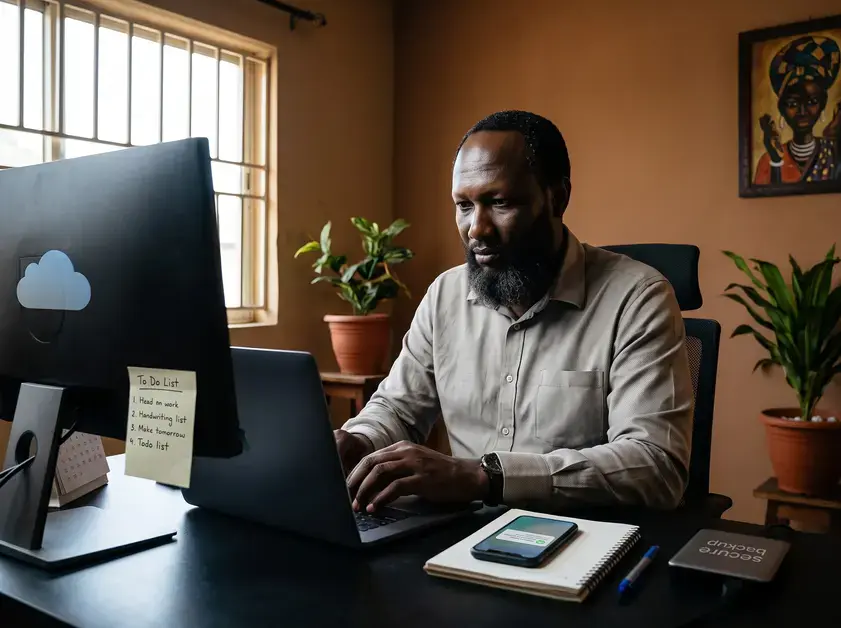
What Is a Remote Work System?
A remote work system is the way you organize your digital work so that you know what to do, where to do it, which tools to use, and when to communicate.
It can include:
| Part of the system | Purpose |
|---|---|
| Workspace | Gives you a consistent place to work |
| Calendar | Shows when important activities happen |
| Task manager | Records what needs to be done |
| Cloud storage | Keeps important files accessible |
| Communication tools | Connects you with clients and collaborators |
| Writing tools | Helps you create documents and content |
| Payment tools | Helps you receive income from clients or platforms |
| Backup system | Protects important work |
| Daily routine | Turns intentions into action |
You do not need a separate application for every function.
In fact, using too many applications can make remote work harder.
The simplest system is usually the one you understand well enough to use consistently.
Start With Your Work, Not Your Apps
One of the easiest mistakes to make is downloading software before deciding what problem you are trying to solve.
A digital entrepreneur might install a project management application, note-taking application, calendar, AI assistant, cloud storage service, time tracker, communication platform, and several browser extensions.
Then the person spends more time maintaining the system than doing the work.
Start with four questions:
- What work must I complete?
- Who am I serving?
- Which activities produce the greatest value?
- Which tools genuinely help me complete those activities?
This approach keeps technology in its proper place.
If your main work is writing, for example, you may need a writing application, cloud storage, research system, calendar, communication tool, and payment method. You may not need ten productivity applications.
Your system should follow your work.
Build Around Your Three Most Important Activities
Most digital entrepreneurs have many responsibilities, but only a few activities create most of their progress.
For a writer, these might be:
- Researching
- Writing
- Publishing
For a consultant, they might be:
- Finding clients
- Serving clients
- Delivering work
For an online educator, they might be:
- Creating lessons
- Teaching
- Supporting learners
Identify your three most important activities and build your remote work system around them.
This is particularly important when working from environments where time, electricity, data, or quiet space cannot always be guaranteed.
When conditions are limited, clarity becomes more valuable.
Choose a Small Core Toolset
You do not need the same software stack as another entrepreneur.
Your core toolset should cover the basic functions of your work without creating unnecessary complexity.
A simple setup might look like this:
Planning: One calendar and one task list.
Communication: One primary email account and one main messaging or meeting platform.
Creation: One reliable writing, design, coding, or production tool.
Storage: One primary cloud storage location plus an offline backup.
Money: One or more reliable payment methods appropriate for your clients and country.
Research: One browser, bookmark system, and note-taking method.
AI can also be part of the system, but it should remain a tool. It can help with research, brainstorming, editing, analysis, and repetitive tasks, while your judgment remains responsible for the final work.
The principle is simple: fewer tools, better use.
Create a Daily Focus System
A remote work system needs a daily operating rhythm.
Before opening social media or responding to every message, identify the most important task for the day.
I find it useful to divide work into three categories:
Must Do: Work that genuinely needs to be completed today.
Should Do: Important work that can move forward if time allows.
Could Do: Useful but nonessential activities.
This prevents every notification from becoming an emergency.
You can also divide your day into focused work and communication periods. During focused work, close unnecessary tabs and silence nonessential notifications. During communication periods, answer messages and handle meetings together.
This simple separation can protect your attention.
Design for Africa’s Real Working Conditions
Remote work advice is often written as if everyone has uninterrupted electricity, fast internet, private offices, modern equipment, and unlimited data.
That is not the reality for everyone.
African digital entrepreneurs may need to work around power interruptions, unstable connectivity, expensive mobile data, shared living spaces, limited hardware, travel, or changing working environments.
Therefore, your system should have a backup plan.
Keep important documents available offline.
Maintain local copies of essential files.
Charge devices whenever reliable electricity is available.
Keep alternative internet options where possible.
Record important information in a way that does not depend entirely on one application.
A good remote work system should continue functioning when one part of it fails.
That is practical digital independence.
Protect Your Attention
Productivity is not only about managing tasks. It is also about managing attention.
A notification can interrupt a thought that took twenty minutes to develop. A social media feed can turn a five-minute break into an hour. Constant messaging can make a full working day feel busy without producing meaningful progress.
Set boundaries.
For example:
- Turn off nonessential notifications during focused work.
- Keep social media outside your primary work browser profile if necessary.
- Schedule communication instead of checking messages continuously.
- Keep your phone away when deep concentration is required.
- Give meetings a defined purpose and time limit.
- Finish important creative work before consuming large amounts of online content.
Your attention is an economic resource.
Treat it accordingly.
Connect Your Tools to Your Purpose
Technology becomes more useful when you know why you are using it.
My own philosophy begins with meaning: M = {B, D²}, Meaning = Being + Doing².
In practical terms, knowing who you are should influence what you do, and what you repeatedly do should express what you believe matters.
The same principle applies to remote work.
Do not ask only, “Which productivity tool should I use?”
Ask:
“Which tool helps me do the work that matters?”
That distinction can prevent technology from becoming another form of distraction.
Create a Simple Weekly Review
Your system should not be something you build once and never examine again.
Once a week, ask:
- What did I complete?
- What remained unfinished?
- What consumed too much time?
- Which tool helped me most?
- Which tool created unnecessary work?
- What should I stop doing?
- What should I continue doing?
- What is the most important result for next week?
This review can take fifteen to thirty minutes.
Do not use the review to create another complicated productivity project.
Use it to simplify.
If a tool is not helping you work better, consider removing it.
Build a System That Can Grow With You
Start small.
You might begin with:
One calendar + one task list + one writing tool + one storage system + one communication channel + one backup method.
As your business grows, you can add tools when there is a clear reason.
For example, a growing business may eventually need customer relationship management, accounting software, team project management, automation, advanced analytics, or specialized design tools.
Add complexity because your work requires it, not because someone online recommended another application.
The same principle applies to your personal development. I have written about the difference between self-improvement and career improvement and why both matter when building a meaningful working life.
Remote Work Tools Should Increase Freedom
The real test of a remote work tool is not how many features it has.
The better questions are:
Does it save me time?
Does it reduce confusion?
Does it protect my work?
Does it improve communication?
Does it help me serve people better?
Does it help me earn honestly?
Does it give me more control over meaningful work?
If the answer is consistently no, the tool may not belong in your system.
This is also why I have found content organization and curation useful. You cannot create everything from scratch every day. A good system helps you collect, organize, and reuse useful information without losing your own voice.
A Simple Remote Work System You Can Start Today
If your current digital workspace feels chaotic, do not rebuild everything at once.
Try this five-step reset:
- List: Write down everything you currently use for work.
- Remove: Delete or stop using tools that provide little value.
- Organize: Put important files, tasks, contacts, and information in clear locations.
- Focus: Identify one important task to complete before dealing with distractions.
- Review: Examine the system at the end of the week and improve one thing.
That is enough to begin.
You do not need a perfect system.
You need a system you can actually use.
Reflection Questions
- Which three activities create the most value in my work?
- Which digital tools genuinely help me perform those activities?
- Which applications consume more attention than they save?
- What would happen to my work if my main internet connection failed tomorrow?
- Does my current remote work system help me live and work according to my purpose?
- What is one tool or habit I can remove this week?
- What is one small improvement I can make today?
1. What is a remote work system?
A remote work system is the combination of tools, routines, workspace arrangements, priorities, and boundaries that helps someone perform work effectively outside a traditional office.
2. How many tools do I need for remote work?
There is no fixed number. Start with the smallest set that covers your essential needs. Add another tool only when it solves a clear problem.
3. What are the most important remote work tools?
Most remote workers need tools for planning, communication, creating work, storing files, managing payments where relevant, and backing up important information. The specific applications depend on the person’s work.
4. How can African digital entrepreneurs work effectively with unreliable internet?
Keep important files available offline, maintain backups, use alternative connectivity when possible, charge devices strategically, and design workflows that do not depend entirely on continuous internet access.
5. How can I avoid becoming distracted by remote work technology?
Reduce unnecessary notifications, separate focused work from communication, limit social media during working periods, and regularly remove tools that create more distraction than value.
Conclusion
Remote work is not simply about working from anywhere.
It is about building a way of working that allows you to use your time, skills, technology, and opportunities wisely.
For African digital entrepreneurs, that system must also reflect real working conditions. Internet access may fail. Electricity may disappear. Devices may be limited. Clients may live in different time zones. Opportunities may come from across borders.
A simple system gives you something stable inside those changing conditions.
Start with your purpose.
Identify the work that matters.
Choose a few useful tools.
Protect your attention.
Prepare for interruptions.
Review your system.
Then improve it slowly.
Technology should make meaningful work easier. It should not become the work itself.
For a digital entrepreneur, true productivity is not having the most applications open. It is being able to use the right tools to turn your skills, ideas, and purpose into useful work.
And if you want to know what’s happening in my world as a writer and digital nomad, check out my Wealthy Affiliate blog page here: https://my.wealthyaffiliate.com/johnmaluth/blog.


Hi Jhon,
I really enjoyed this article. I especially liked the idea that remote work isn’t about using more apps, but about creating a simple system that actually works for you. The section about unreliable internet and electricity also made the advice feel realistic and relevant. Overall, practical, easy to understand, and full of useful ideas.
Thank you, Daniella. I’m glad the practical side of remote work came through. For me, a good remote work system has to work not only when everything goes smoothly, but also when the internet is unreliable, electricity goes out, or plans change unexpectedly. Simplicity and resilience are just as important as productivity.
I wish you the greatest success in your new direction for your career. This is a great reading and I look forward to getting one of you books next week
MAC
Many thanks, Michael, for you reading and the interest to have one of my books on Amazon. I deeply appreciate it. Please share my works with others in your world. Cheers!